Hub Activity Workflow Summary
This page walks through how Maestrow generates a Hub Activity Report, using MLA for the week of 8 December 2025 as a worked example.
1. User Prompt
This request activates Maestrow's Route and Schedule Planning Assistant along with the Analytics Agent, triggering a full data retrieval and processing workflow.
2. System Workflow
Maestrow performs the following steps automatically for all Hub Activity Report requests:
Step 1 — Interpret the request
Maestrow identifies:
- Hub Station — MLA (Malta International Airport)
- Analysis Period — week of 8 December 2025
- Display Logic — daily flights (7/7) shown once; non-daily flights shown per operating day
Step 2 — Select the correct schedule dataset
The Analytics Agent queries for published SSIM datasets and selects:
- Dataset used —
ssim_published_2025w48(schedule file covering the week beginning 8 Dec 2025)
Codeshares are automatically excluded.
Step 3 — Extract hub-related activity
The platform filters all flights:
- Arriving to MLA (inbound)
- Departing from MLA (outbound)
- Operated by all carriers, excluding codeshares
- With full metadata: equipment, terminals, block times, and operating days
Step 4 — Normalise daily and weekly patterns
- If
Operating Days = Daily— the record is shown once - If not daily (e.g. Mon/Thu) — a separate row is produced for each operating day
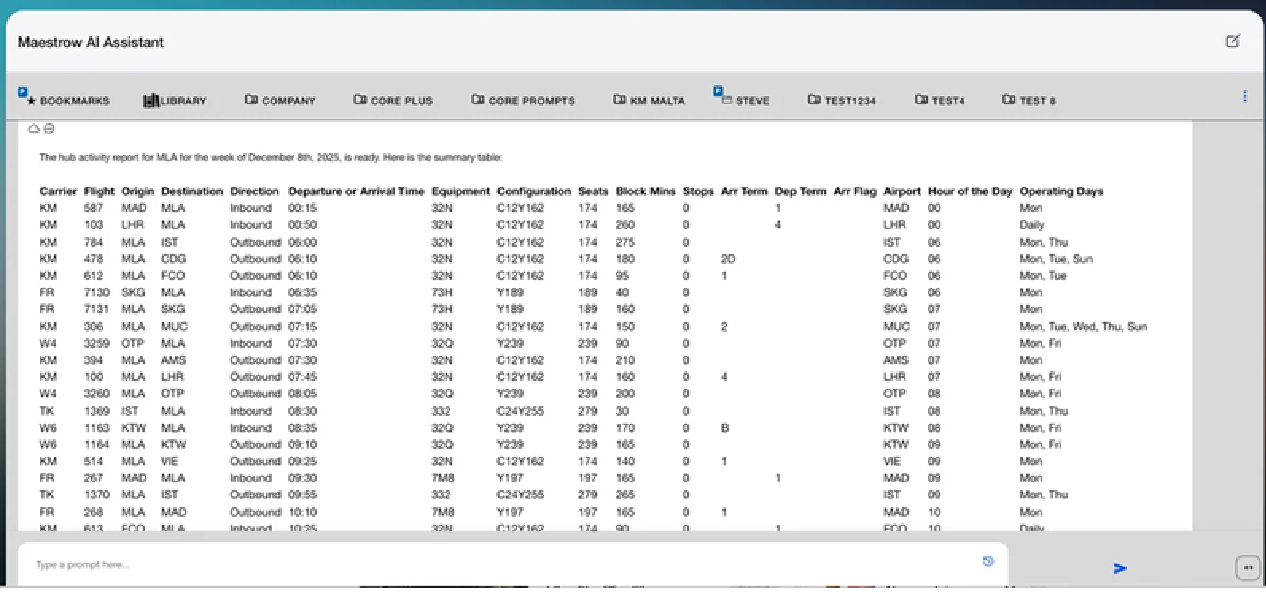
Step 5 — Produce a structured summary table
Maestrow compiles a table including:
- Carrier and flight number
- Origin/destination
- Direction (inbound/outbound)
- Departure/arrival time
- Equipment type and seat configuration
- Block minutes
- Terminals
- Operating days
- Hour of day (for peak-hour analysis)
3. Output
Maestrow returns a structured dataset. The complete table contains 100+ rows for the full operating week, covering all inbound and outbound activity for every operating carrier.
4. What This Analysis Enables
Operational Density
- Total movements per hour
- Peak arrival and departure banks
- Carrier concentration by time of day
Carrier and Route Performance
- Daily vs non-daily service patterns
- Equipment utilisation (e.g. 32N, 7M8, 77W)
- Seat capacity distribution
Coordination and Slot Management
- Terminal load profiles
- Gate and resource planning windows
- Ground-handling requirements per hour
Schedule Strategy
- Opportunities for additional connectivity
- Over- or under-utilised time banks
- Competitive presence by airline or market
5. Workflow Summary
- User specifies hub and week
- Maestrow identifies the correct published SSIM dataset
- All arrivals and departures for the hub are extracted
- Daily flights shown once; non-daily flights expanded by day
- Clean, structured table is generated in chat
- Users can export, analyse peaks, compare week-over-week, or feed the output into downstream modules (connectivity, QSI, bank analysis, etc.)