Connectivity Analysis — Debug Mode
Hub Connectivity Analysis and the Connection Builder apply Traffic Restriction (TRC) and MCT Exception rules to connections before returning results. To view which connections were excluded and the rules applied, enable debug mode by adding one of the following keywords to your prompt.
Keywords
enable debugshow logs
Prompt Examples
Hub connectivity without debug
Analyze the hub connectivity at MUC for KM on 2025-12-20. I want to identify connections that are closest to the MCT. Please rank these connections by their deviation from the MCT, showing connections with transfer times between up to 30 minutes shorter than MCT allowed and 100 minutes later than the MCT and 200 mins max connect time.Hub connectivity with debug
Analyze the hub connectivity at MUC for KM on 2025-12-20. I want to identify connections that are closest to the MCT. Please rank these connections by their deviation from the MCT, showing connections with transfer times between up to 30 minutes shorter than MCT allowed and 100 minutes later than the MCT and 200 mins max connect time, enable debugConnection builder with TRC and MCT logs
list flights connections from eze to lhr on 2025-12-20, show logsExample Outputs
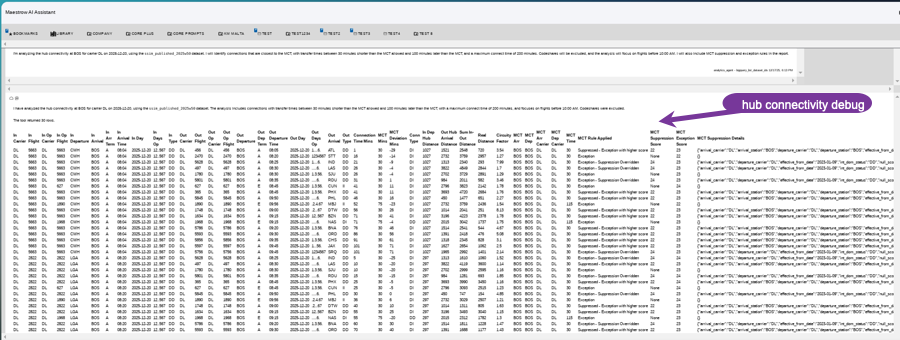
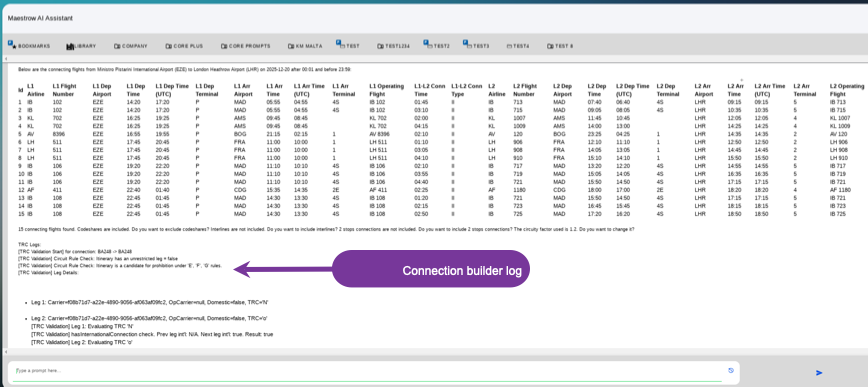
Recommendations
- A thorough knowledge of TRC and MCT Exception rules is assumed
- Run the connectivity analysis without debug first, then repeat with debug enabled — debug mode shows all connections considered before application of MCT and TRC rules
- Compare the filtered-out flights against the Connection Builder logs or additional columns on the Hub Connectivity output to identify which rules were applied
- Refer to the full SSIM reference or MCT data for further interpretation