Home Page Navigation
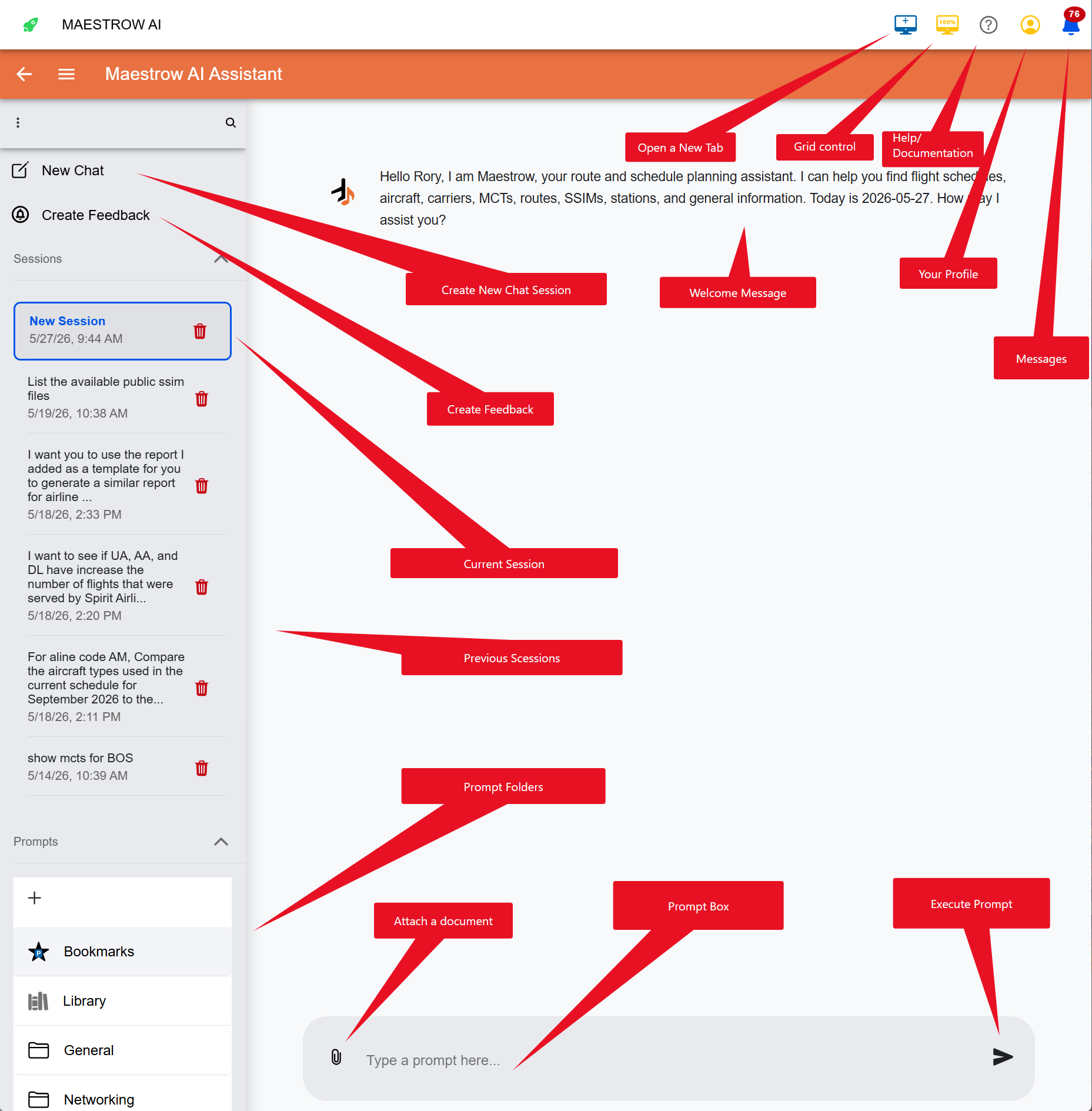
The Maestrow home page is your central workspace. The screenshot below shows the layout and key components.
Page Components
| Component | Description |
|---|---|
| Attach a document | Allows the attachment of documents for applicable only to the session |
| Help | Opens the Maestrow Documentation website in a new browser tab |
| Current Session | This is the session you are working on |
| Chatbot | The Maestrow AI chat interface for interactive conversations |
| Create Feedback | Capture the session information to help trouble shoot issues for engineering team |
| Create New Chat Session | Creates a new session in the same window tab |
| Execute Prompt | executes prompt, you can also press enter |
| Grid Control | Adjusts the with of your screen |
| Messages | Message and Alert Center |
| Open New Tab | Opens a new session in a new Tab |
| Previous Session | Historical list of previous chats you can access |
| Profile | Opens the profile dropdown for user settings and logout |
| Prompt Box | Area you will enter your prompt |